Content Menu
● Understanding the Role of a HEPA Air Filter
● Do All Honeywell HEPA Filters Need Cleaning?
● Tools and Materials You'll Need
● Step-by-Step Guide: How To Clean HEPA Filter Honeywell Air Purifier
>> 1. Turn Off and Unplug the Air Purifier
>> 2. Open the Filter Compartment
>> 3. Remove the Pre-Filter
>> 4. Inspect the HEPA Air Filter
>> 5. Vacuum the HEPA Filter (If Allowed)
>> 6. Clean Washable HEPA Filters (If Applicable)
>> 7. Reinstall the Filters
>> 8. Reset the Filter Indicator
>> 9. Power On and Test
● When To Replace a HEPA Air Filter
>> Signs That Your Filter Needs Replacement:
● Maintenance Tips for Long-Lasting Performance
● Common Mistakes To Avoid
● Benefits of Maintaining a Clean HEPA Air Filter
● Conclusion
● FAQs
>> 1. How often should I clean the Honeywell HEPA Air Filter?
>> 2. Can I wash all Honeywell HEPA filters with water?
>> 3. How do I know when to replace my HEPA Air Filter?
>> 4. Is vacuuming a safe way to clean a HEPA filter?
>> 5. What happens if I don't clean or replace my HEPA Air Filter?
Maintaining a clean HEPA Air Filter in your Honeywell air purifier is one of the most important steps in ensuring effective air purification for your home, laboratory, or production environment. A dirty filter not only reduces filtration efficiency but can also strain the purifier's motor, increase energy usage, and compromise indoor air quality.
In this detailed guide, we will explore how to clean and maintain a HEPA Air Filter Honeywell Air Purifier, understand when to replace or wash filters, and learn how to maximize the lifespan of your equipment safely and efficiently.
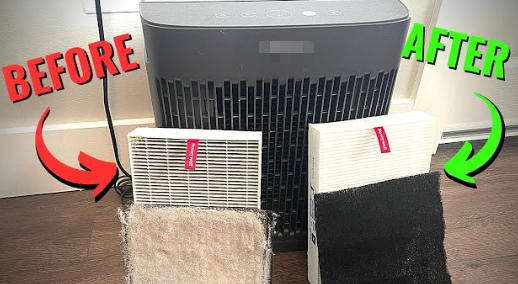
Understanding the Role of a HEPA Air Filter
The HEPA (High-Efficiency Particulate Air) filter is the heart of every Honeywell air purifier. Its purpose is to capture airborne particles as small as 0.3 microns, including dust, pollen, bacteria, mold spores, and even some viral particles. This level of filtration is particularly beneficial for environments where air purity is essential — such as pharmaceutical facilities, cleanrooms, laboratories, and healthcare spaces.
A Honeywell HEPA Air Filter typically consists of multiple layers of fine fibers arranged in a dense, pleated pattern. The pleats increase the surface area, allowing the purifier to trap large amounts of contaminants while maintaining smooth airflow.
Do All Honeywell HEPA Filters Need Cleaning?
Before proceeding with cleaning, it's important to distinguish between washable (permanent) filters and non-washable (replaceable) filters.
- Washable (Permanent) HEPA Filters:
Some Honeywell models are designed with a permanent HEPA filter that can be gently cleaned and reused. However, even “washable” filters have a limited lifespan and eventually require replacement after several clean cycles.
- Non-Washable (True HEPA) Filters:
The majority of Honeywell purifiers use True HEPA filters, which are not washable. Washing a non-washable filter can permanently damage the fibers, compromise filtration performance, and void the warranty. Instead, these filters should be periodically vacuumed (if allowed by the manufacturer) or replaced when the indicator light turns on.
Always consult your purifier's user manual or Honeywell website to confirm the filter type before attempting any cleaning process.
Tools and Materials You'll Need
To safely clean or maintain your Honeywell HEPA Air Filter, you'll need a few basic tools and cleaning supplies:
- Soft, dry microfiber cloth
- Low-suction handheld vacuum cleaner with a brush attachment
- Compressed air (optional for gentle dust blowing)
- A clean, flat surface to work on
- Replacement filters (if needed)
Avoid using detergents, alcohol, or water unless the manual specifically states that your model uses washable filters.
Step-by-Step Guide: How To Clean HEPA Filter Honeywell Air Purifier
Follow these steps carefully to ensure that your HEPA Air Filter remains effective and long-lasting.
1. Turn Off and Unplug the Air Purifier
Always start by switching off the purifier and disconnecting it from the power source. Safety is critical when performing any maintenance work. Wait a few minutes to allow the internal components to cool down before opening the machine.
2. Open the Filter Compartment
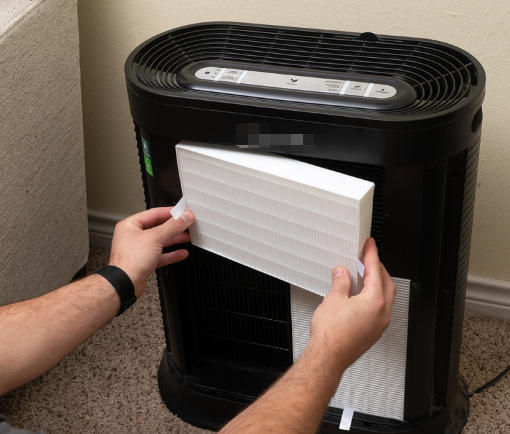
Locate the filter compartment, typically found at the back or bottom of the air purifier. Gently remove the cover or panel according to the manufacturer's instructions. Honeywell purifiers are usually designed for easy access without the need for tools.
3. Remove the Pre-Filter
Most Honeywell models include a carbon pre-filter that traps larger particles and odors before air reaches the HEPA filter. This pre-filter can often be vacuumed or replaced separately. Carefully remove it and check whether it's washable or disposable.
4. Inspect the HEPA Air Filter
Once the pre-filter is removed, you'll see the main HEPA Air Filter. Examine it closely under good lighting:
- If it's heavily gray or coated with visible dust and debris, it likely needs cleaning (if washable) or replacement.
- If it's slightly dusty but still functional, a gentle vacuuming may suffice.
5. Vacuum the HEPA Filter (If Allowed)
If your HEPA Air Filter is labeled as non-washable but vacuum-safe, use a handheld vacuum cleaner with a soft brush attachment. Run the brush gently over the pleats, removing surface dust without pressing or bending the delicate fibers. Always vacuum in the direction of airflow to prevent damaging the structure.
6. Clean Washable HEPA Filters (If Applicable)
For Honeywell models with washable HEPA filters, follow these steps:
- Rinse the filter under cool running water. Never use hot water or high water pressure.
- Avoid soap or cleaning agents, as they can leave residues that block airflow.
- Allow the filter to air dry completely for at least 24 hours before reinstalling it. Placing a damp filter back in the unit can lead to mold growth and odors.
7. Reinstall the Filters
After the HEPA Air Filter and pre-filter are clean and dry, reinsert them in the correct order. Make sure they fit snugly to prevent air bypassing the filter. Close and lock the compartment securely.
8. Reset the Filter Indicator
Most modern Honeywell purifiers come with a filter indicator light. After cleaning or replacing the filters, reset the indicator by pressing and holding the reset button for a few seconds until the light turns off.
9. Power On and Test
Turn on the purifier to check for correct airflow and normal functioning. You should notice improved airflow and reduced noise, confirming that your HEPA Air Filter is now clean and unobstructed.
When To Replace a HEPA Air Filter
Even with regular cleaning, all filters eventually reach the end of their lifespan. On average, a Honeywell True HEPA Air Filter should be replaced every 12 months, depending on usage and environmental conditions.
Signs That Your Filter Needs Replacement:
- Persistent odors even after cleaning.
- Weak airflow or unusual noises.
- Stubborn dust build-up that cannot be removed.
- The filter replacement indicator remains illuminated after resetting.
- Increase in allergy or respiratory symptoms among occupants.
Replacing your filter on time ensures your Honeywell air purifier maintains maximum efficiency and prolongs the service life of its motor and fan components.
Maintenance Tips for Long-Lasting Performance
To keep your Honeywell HEPA Air Filter and air purifier performing optimally, follow these best practices:
- Vacuum or replace pre-filters regularly to reduce the load on the main HEPA filter.
- Place the purifier in an open area away from curtains or walls to ensure adequate airflow.
- Avoid exposure to smoke, aerosols, or oils, as sticky residues can clog filters.
- Run the purifier on auto or low mode for continuous operation and steady filtration.
- Monitor the air quality indicator, if available, to track performance in real time.
These steps will help extend the lifespan of your purifier, prevent frequent replacements, and maintain clean indoor air quality.
Common Mistakes To Avoid
1. Washing non-washable filters: This damages the internal fiber mesh and voids product warranties.
2. Using moisture before complete drying: A damp HEPA Air Filter can promote bacterial and mold growth.
3. Using harsh chemicals: Only use water (for washable filters) or dry vacuuming methods.
4. Neglecting pre-filters: Dirty pre-filters shorten the main HEPA filter's lifespan.
5. Ignoring airflow direction: Wrong installation can reduce filtration efficiency dramatically.
Avoiding these mistakes will keep your air purifier performing at peak capacity and prevent premature wear on internal components.
Benefits of Maintaining a Clean HEPA Air Filter
- Improved Air Quality: Consistently clean filters trap allergens, dust, smoke particles, and microorganisms.
- Energy Efficiency: A clean HEPA Air Filter reduces the strain on the purifier's motor, lowering energy consumption.
- Extended Lifespan: Proper filter care prevents overheating and extends unit durability.
- Healthier Environment: Cleaner air promotes better respiratory health and reduced exposure to harmful pollutants.
These advantages highlight why proper filter care is crucial, not only for Honeywell users but for anyone relying on purified air in their everyday life or professional environment.
Conclusion
Cleaning your HEPA Air Filter Honeywell Air Purifier is an essential maintenance routine that directly affects both air quality and equipment longevity. Whether your unit uses a washable or non-washable HEPA filter, the right cleaning and replacement schedule ensures consistently high performance and energy efficiency.
By following the outlined steps—unplugging the purifier, carefully removing the filters, vacuuming or rinsing as permitted, drying completely, and resetting the indicator—you'll ensure your air purifier functions at its best. Regular upkeep guarantees that your Honeywell purifier continues to deliver pure, fresh, and safe air for years to come.
FAQs
1. How often should I clean the Honeywell HEPA Air Filter?
You should inspect the filter every month and clean or replace it every 6 to 12 months, depending on usage and environmental pollution levels.
2. Can I wash all Honeywell HEPA filters with water?
No. Only models labeled as “washable HEPA filters” should be rinsed with water. True HEPA filters must never be washed, as moisture will ruin their fine fiber structure.
3. How do I know when to replace my HEPA Air Filter?
Most Honeywell purifiers include a filter indicator light that signals when replacement is necessary. Persistent dust, reduced airflow, or lingering odors are also clear warning signs.
4. Is vacuuming a safe way to clean a HEPA filter?
Yes, if your filter is marked as non-washable but vacuum-safe. Always use a soft-brush attachment and avoid strong suction to prevent damage.
5. What happens if I don't clean or replace my HEPA Air Filter?
Neglecting filter maintenance reduces air purifier efficiency, increases energy use, and allows allergens and pollutants to circulate back into your indoor air.


